Tuesday, September 1, 2020

25 Best Company Marketing & Sales Brochure Templates (Design Examples 2020)

25 Best Company Marketing & Sales Brochure Templates (Design Examples 2020)

Got a new business to launch or an existing company to market? 

An effective marketing brochure provides an easy and accurate picture of what your company is about and your products or services. A badly designed product brochure can lead to a negative perception of your brand⁠. The wrong brochure can push customers away and drive them to your competitors.

Arco Business Brochure
Arco Business Brochure is one of the most creative marketing brochure templates designed perfectly for any industry to market your business and sell your products or services effectively.

Feeling the pressure? To create a company brochure that sells, you don't have to come up with creative marketing brochure ideas on your own. We've curated the best marketing brochure templates that you can easily customize, saving you time and effort.

Use company brochures for a variety of marketing needs. We'll show you the best marketing brochure examples. We'll also guide you on how to design marketing brochure content that wins the hearts of potential customers.

Best Company Marketing & Sales Brochure Templates on Envato Elements (With Unlimited Use)

A company brochure is great marketing real estate to promote your brand to potential customers. It can also remind existing customers to come back and buy again.

Envato Elements
Envato Elements: one subscription including more than 53 million assets.

A single subscription with Envato Elements enables you to access a wide variety of marketing brochure templates. This powerful subscription comes with unlimited downloads and access to hundreds of thousands of digital assets.

Marketing Brochure Examples from Envato Elements
Make the most of your money from just one subscription using the best marketing brochure examples from Envato Elements.

From creative marketing brochure ideas to sales brochure ideas, you can choose the right company brochure template and customize the design to match your branding requirements. Add your company logo, change the colors, or use your brand's fonts with ease. 

10 Great Company Brochure Designs for 2020 (Brochure Templates From Envato Elements)

To get you started quickly, we've carefully hand-picked the best marketing brochure templates from Envato Elements for 2020: 

1. Florist Company Brochure (INDD)

Florist Company Brochure

To begin our selection of the best company brochure templates, we've got this profile brochure to help you promote your business. With a stunning minimalist design, this brochure contains 24 pages in A4 and Letter size. It's really easy to edit in InDesign.

2. Company Profile Landscape Template (INDD)

Company Profile Landscape Template

If you're looking for something different, check out this one with landscape orientation. This company brochure features a clean and modern design and 12 pages ready to edit in Adobe InDesign.

3. Company Proposal Brochure (AI, EPS, INDD, PSD)

Company Proposal Brochure

A proposal brochure can be very useful if you run a business. Check out this complete template in A4 size that can be easily customized to fill all your needs. The best part about this company brochure template is that you can edit it with many software suites: InDesign, Photoshop, Illustrator, and even PowerPoint and Google Slides.

4. Company Branding Square Brochure Template (INDD)

Company Branding Square Brochure Template

Company brochures in different sizes are a guaranteed way to catch attention and stand out. Try this square company brochure template with 24 pages and a cool minimalist design. Edit it in InDesign and create a unique branding brochure.

5. Moving Company Brochure Bifold (AI, EPS, INDD, PSD)

Moving Company Brochure Bifold

This bifold brochure is perfect for any business or company. Use this attractive design with geometric figures to stand out. It comes in A4 and Letter size, and you can edit it using so many types of software: Illustrator, Photoshop, InDesign, and Microsoft Word.

6. Square Company Brochure Profile (INDD)
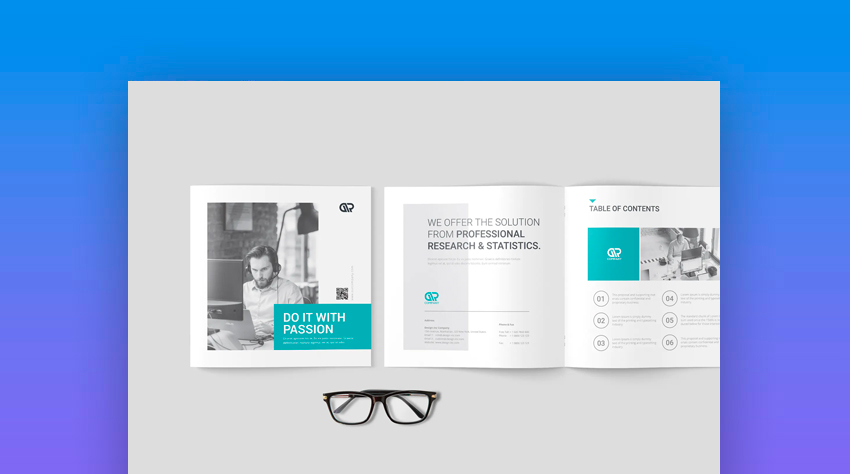
Square Company BrochureProfile

With its clean and modern layout, this template is one of the most popular company brochure examples this year. The graphics and other design elements can be recolored and scaled to match your company's brand.

7. Bifold Brochure (EPS)
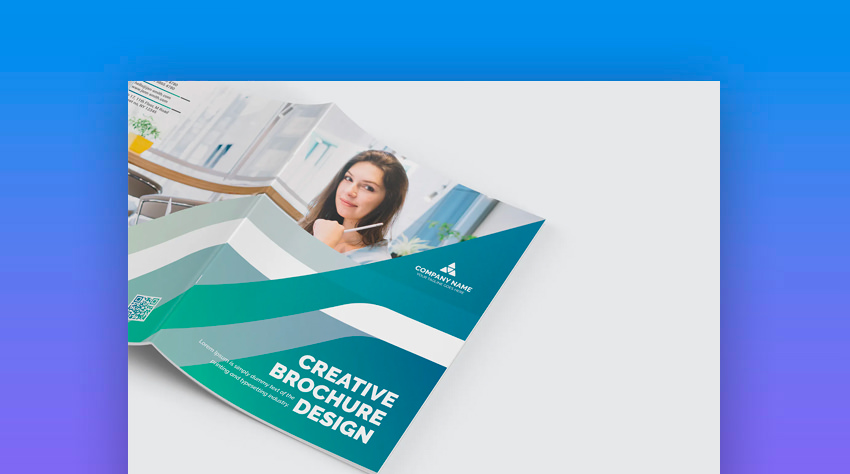
Bifold Brochure

This is one of the informational brochure examples that's got a more professional look and feel to it. It's perfect for companies in finance, banking, insurance, investment, and other similar industries.

8. Fashion Trifold Brochure (EPS, AI, JPG)

Fashion Trifold Brochure

A more futuristic design, this one-page marketing brochure comes with a trifold layout. It's specifically created for fashion, clothing, bags, shoes, or apparel retailers.

9. The Company Brochure (INDD)

The Company Brochure

Exuding with elegance, this is one of the sales brochure ideas that'll help you capture potential customers for your business. It's got a dark and modern finish that's perfect for luxury products.

10. Product Brochure (INDD)

Product Brochure

Available in 20 layout pages, this marketing brochure offers a variety of designs to choose from. This is highly recommended for companies with diverse and extensive products.

Envato Elements (Design Without Limits)
Envato Elements Design Without Limits
Envato Elements: unlimited template downloads for one low price.

Envato Elements has a single compelling (all-inclusive) offer:

Sign up for Envato Elements and you get access to tons of unlimited-use graphics and templates. Get great web themes, the best company marketing brochure templates, and more—all for one low price

Get unlimited downloads from a massive digital warehouse of creative assets
Get unlimited downloads from a massive digital warehouse of creative assets.

That’s right! Download as many professional templates and graphics as you want, and customize them to fit any of your project needs.

While Envato Elements is a powerful option, if you prefer to buy unique company marketing brochure templates one at a time (instead of getting unlimited access to hundreds of professional designs), check out the selection from our GraphicRiver marketplace below.

15 Best Company Brochure Examples in 2020 From GraphicRiver

If you're looking for one-time use, then a great affordable alternative is the marketing brochure templates from GraphicRiver. These marketing brochure templates have modern graphics, stunning typography, and customizable photography.
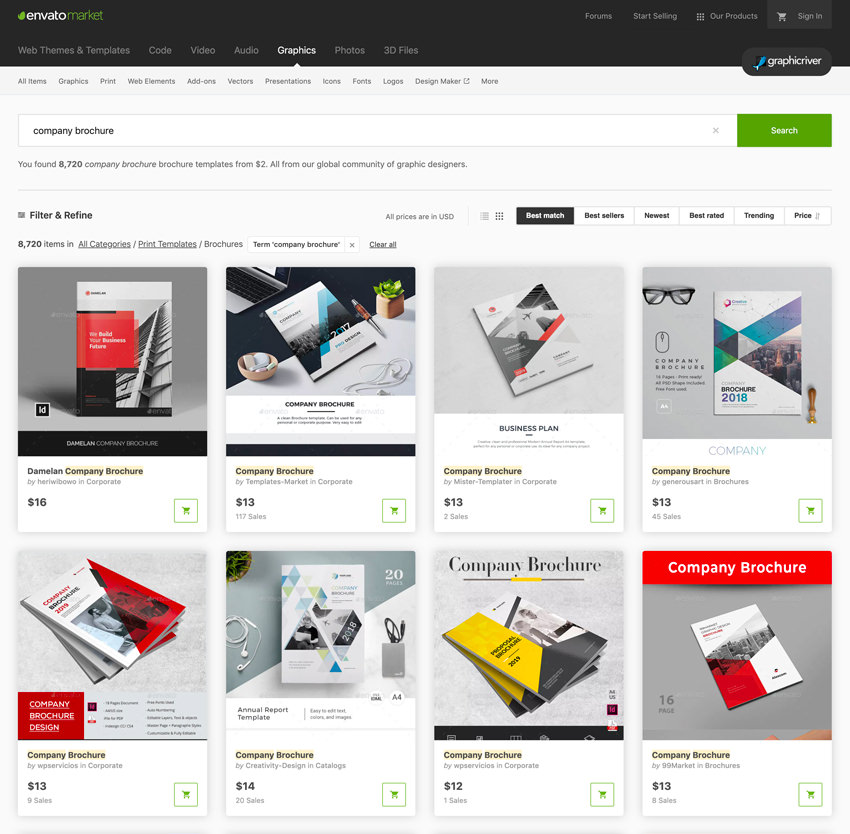
GraphicRiver templates
Buy individual company brochure templates on GraphicRiver.

From a huge collection of company brochures, just purchase the right template from the following business brochure examples on GraphicRiver:

1. Company Brochure (INDD)

Company Brochure

Get this stylish template from one of the most sought-after company brochure examples for marketing, sales, photography, real estate, and travel companies. It's got a two-color palette that can be easily changed to match your brand.

2. Modern Company Bifold Brochure (INDD)

Modern Company Bifold Brochure

This bifold template is a top choice for any marketing brochure content. It's got a clean visual structure so you can communicate your content more effectively. It also uses vibrant colors so you can evoke an engaging brand.

3. A5 Booklet/Catalogue/Brochure (INDD)

A5 BookletCatalogueBrochure

Made for a variety of purposes, this template is one of the best company booklet examples on the market today. It's got a straightforward layout that can be easily supplemented with product photos and descriptions. It uses clean graphics and bold colors.

4. Construction Company Trifold Brochure (PSD, EPS, INDD, AI)

Construction Company Trifold Brochure

There's nothing more appropriate for the construction or real estate industry than this company brochure. It's got a trifold layout with a bold and bright design, so you can highlight your content easily.

5. Corporate Business Brochure (INDD)

Corporate Business Brochure

This ready-to-print company brochure comes with 16 pages of professional and modern layouts. This template is also highly customizable⁠—just add your own logo and photos, and you're ready to go.

6. Luxury Brochure for Property - Hotel - Interior (PSD, INDD)

Luxury Brochure for Property - Hotel - Interior

Crafted for hotels, interior designers, and luxury brands, this marketing brochure template exemplifies elegance at its finest. With minimal graphics, you can focus more on showcasing photos of interiors and other relevant attractions.

7. The Brochure (INDD)

The Brochure

The geometric graphics and modern feel make this template one of the best company brochure samples. It's suitable for any kind of business or industry out there.

8. Modern Brochure 8 Page (PSD)

Modern Brochure 8 Page

If you want a more futuristic layout with a professional tone, this sample is one of the highly recommended sales brochure ideas for you. It can be used for a variety of purposes too.

9. Product Brochure Template (PSD)

Product Brochure Template

With a fun and colorful touch, this product brochure is at the top of creative marketing brochure ideas for 2020. It's got a vibrant and engaging structure suitable for next-generation companies.

10. Electronic Sales Brochure Tri-Fold (INDD)

Electronic Sales Brochure Tri-Fold

If you're looking for sales brochure ideas, this company brochure template is designed to promote your sales campaigns. It's also highly recommended for electronic products like laptops, cameras, and mobile phones. 

11. Content Marketing Trifold Brochure (PSD)

Content Marketing Trifold Brochure

Perfect for marketing companies, ad agencies, and digital industries, this tri-fold company brochure has a sharp and modern cut. It's also perfect for content marketing services and other online projects.

12. Kreatype Company Brochure (INDD)

Kreatype Company Brochure

Geared towards a more traditional look, this template is one of the best informational brochure examples. You can use this to design a more refined and sophisticated company brochure.

13. Square Company Brochure (INDD)

Square Company Brochure

This template is one of the best marketing brochures examples out there, evoking both simplicity and creativity. It doesn't have heavy graphics but is still visually striking.

14. State Company Brochure (EPS, INDD, AI)

State Company Brochure

A fully editable and customizable template, this company brochure can be used for any type of company, project, or advertising promotion. It's perfect for government agencies and state departments as well.

15. Business Company Brochure (INDD)

Business Company Brochure

If you've got more content and photos to showcase, this template is one of the highly recommended informational brochure examples that you can conveniently use.

7 Proven Tips for Making Great Company Marketing & Sales Brochures

Now that we’ve covered a variety of diverse marketing brochure templates, we’ll show you some creative and practical tips. Learn how to customize marketing brochures according to your branding needs. 

The following section outlines how you can use your company brochure to make a lasting impression on your potential customers.

1. Get Straight to the Point

You may be tempted to list too many details on your marketing brochure because you don't want to miss any relevant information. However, this will do you more harm than good.

Company Trifold Brochure Vol 03
A good layout can help you stay on track when writing your content. This Company Trifold Brochure Vol. 03 is one of the great examples of marketing pamphlets that'll simplify your content structure.

Too many details can cause information overload. This can also confuse your readers and steer them away from your main points. As much as possible, focus on one main objective for your marketing brochure and then build your content from there.

2. Know Your Customers

To deliver a powerful message that catches attention from your target audience, you must really know who your customers are and what they're looking for. Insights about customers will help you determine the purpose of your campaign’s brochure and guide you through the content and design.

For example, if your company sells high-end smart toys for children, you'd likely want to target educated, young to middle-aged parents who can afford the products and advocate the idea of helping children learn while they play with toys. The better you know your audience’s personas, the better you can design graphics and messages that resonate with their problems and desired solutions. 

3. Write an Impressive Headline

No one will continue reading the contents of your company brochure if the headline on the front page doesn't stir the readers' interest. Why bother creating a brochure if your readers will just read the front and then discard it? This is why it's crucial that you captivate your audience right away with an impressive headline.
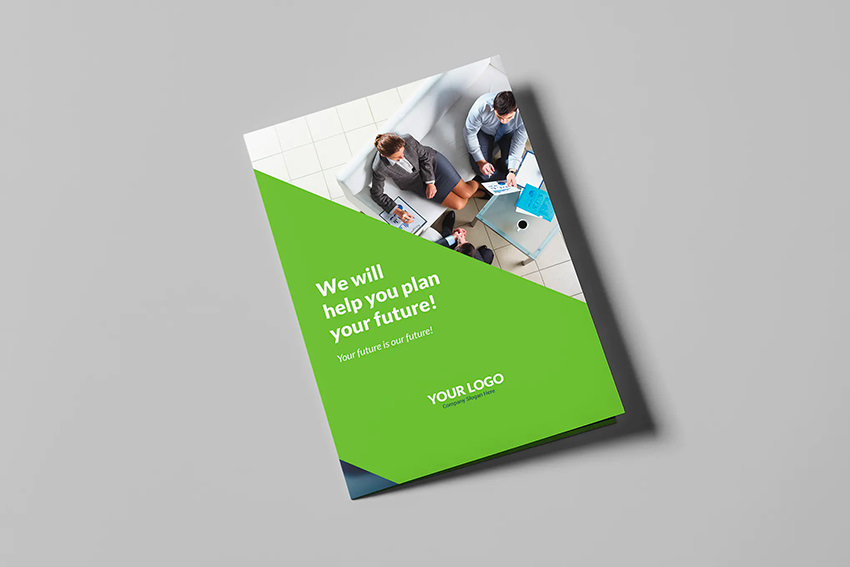
Brochure Company Bi-Fold
The headline from this Brochure – Company Bi-Fold template is a perfect example of a captivating headline that'll hook your audience from the very beginning.

An effective headline must capture the interest of your target audience and address their key problems. Many company brochures make the mistake of just putting the company's basic information on the front page.

4. Use Simple Words

Avoid using big words when crafting your company brochure. You don't have to impress your readers with words that are hard to understand.

Simple words are highly recommended because they're easier to digest. The faster your readers can grasp your ideas, the faster you can convert them as well. If your readers don't comprehend your content, you're wasting not just their time but also your money.

5. Don't Forget the Basics

Because your main focus is to stand out, you might omit the basics when creating a company brochure. Make sure that pertinent information like company name, business address, logo, and at least two modes of contact information, preferably email address and phone number, are included.

Business Brochure Examples
Here's one of the best business brochure examples from Envato Elements, with contact information on the back cover.

Aside from the basic company information, it's crucial that you add at least two or three brief sections about the benefits or solutions that your products or services can offer.

People are interested to know how your company can solve their problems or how can you make their lives a lot easier with your offerings. You should outline your benefits in easy-to-read blocks so your readers can digest them faster.

6. Impress With Big Numbers

Numbers don’t lie. Numbers strike people with unrealized truths and do a good job of convincing people to take action. Your marketing brochure is a direct weapon in your go-to-market strategy, so why not add some striking numbers that address the need for your products?

Find a big number that'll surprise your audience. Present it crystal clear on your brochure. Then, put it alongside your products or services as a catalyst for the urgent need for a solution.

7. Add Stunning Photography

It's also recommended to add photos of your products if you've got physical products to offer. Using hero images is also a great way to showcase your services.

For example, if you're a restaurant, at least include photos of your most popular dishes in your company brochure. Using the Brochure – Restaurant Tri-Fold template, you can add your own photos to capture your audience easily.

Brochure Restaurant Tri-Fold
This small company marketing brochure features stunning food images.

Learn More About Brochure Design

If you're new to brochures and design software, creating the best company brochure can seem like a complicated task. But don't stress—I'll share with you some useful resources for your next brochure design project.

Even though there are plenty of design packages you can use, Adobe InDesign is usually a great choice, since it was built especially for print design. If you choose to use this one, we've got these awesome courses you can view:

Explore More Brochure Templates

Now, you've seen our best company brochure templates and great tips and resources on brochure design. Before you go, I've got these brochure templates you can check out for more inspiration: 

Choose Your Favorite Marketing Brochure Template

An effective company brochure must be informative and memorable at the same time. We've provided you with a great selection of marketing brochure templates from Envato Elements that you can customize to create professional-quality company brochures. We've also shared some expert tips to help you master the content and design of your brochures.

You can also access the most suitable new product brochures with 2020's Best-Selling Brochure Templates from GraphicRiver so that you can make a stunning marketing brochure that stands out.

Now it's your turn to start brainstorming and creating the best brochures for your company’s promotion campaigns. Download a marketing brochure template now.


How to Update and Improve Your Outdated Resume Quickly

How to Update and Improve Your Outdated Resume Quickly

Your days of networking finally paid off. One of your contacts is willing to recommend you for a job opening at their company. Score!

Because you don’t want to disappoint your new friend and you know that referral candidates are more likely to be hired, you want your resume to be perfect.

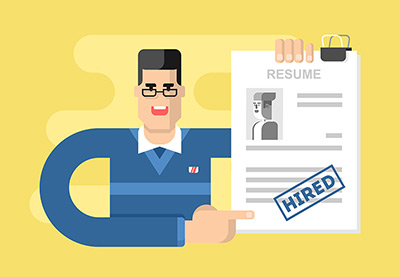
How to Update and Improve your resume
How do you edit, update, and improve your resume—to make it great? (graphic source)

But it’s been months (or years) since you last updated your resume. It’s outdated but you don’t have time to create a new one.

Don’t panic, there are many things you can do to update your resume. Let's look at the best strategies you can use to revise your resume, as well as what to avoid.

The Dangers of “Just Getting Rid of the Old Stuff” Approach

When you’re moving to a smaller apartment, throwing out old and unused items to make way for new ones is a sensible approach. But it’s not the best approach when it comes to your resume.

Just deleting old job entries is an overly simplistic approach. Why?

  • It doesn’t take into account if what you’re deleting is relevant to your future career.
  • It doesn’t consider how your previous jobs contribute into your overall career.
  • Mindlessly adding what’s new detracts attention from the skills and achievements you want to emphasize.

The Right Way to Update Your Resume: By Your Work Experience

Here's how to edit and update your resume according to your professional experience.

1. Updating Your Resume: For Professionals With 2 to 5 Years of Experience

You got a job after college. Now you have the minimum work experience required in most job ads, so you can bump your education towards the end of your resume.

Focus on your professional experience instead of relying on your college education and extra-curricular activities.

If you want to go a step further, think about a time where you demonstrated your leadership, communication, and decision-making skills. Because you’re still a relative newbie to the workforce, it’s important to emphasize that you’re an independent employee that doesn’t need micro-managing.

Not sure what to write? 

  • Have you ever trained a new co-worker?
  • Made an important decision
  • Identified a potential problem and came up with a solution
  • Had to finish a project or task on your own, despite incomplete instructions or your boss’s absence

These experiences don’t need to have widespread effects in your previous job. What’s important is to demonstrate your initiative.

2. Updating Your Resume: For Professionals With 5+ Years of Experience and New Supervisors

Unfortunately, not everyone gets promoted during their first five years in the workforce, so I’ll separate these sections into two groups.

I’ve seen supervisors with two or more years of experience in management revert to their previous roles after resigning. It’s sad but preventable if you can prove you have what it takes.

Add accomplishments and certifications that prove you’re a real leader, and that your previous or current company didn’t make a mistake promoting you.

Think about a time when:

  • You helped the company save or earn more money.
  • Did you help create training material?
  • Did one of your subordinates get promoted?
  • Have you increased your team’s productivity?

Not yet promoted? It’s time to change that.

With five or more years in your current job, you’re now out of the junior employee field. Your resume should reflect that.

Remove mentions of basic duties an intern would do. Talk about your accomplishments and projects more, especially the ones where you played a major role. If you must add day to day tasks, focus only on high-level tasks that demand your attention, not something you can delegate to a greenhorn.

3. Updating Your Resume: For Executives with 15 to 20+ Tenure in the Workforce

Edit your resume to remove positions you’ve held 10 years ago.

“If a previous position is relevant to what you’re applying for, keep it. But keep the details minimal and focus exclusively on your achievements and wins”, says Mary Rosenbaum of Your Career by Design

Write an executive-worthy summary. Improving your team’s absentee rating would’ve been impressive as a new manager, but that’s not enough to withstand the competition in senior-management roles. Focus more on big picture accomplishments.

Ideas to include in your summary:

  • Policy changes that affected the company
  • Regional awards
  • Partnerships created with other businesses and competitors
  • C-level work
  • Strategic planning

After updating the core content of your resume, it's also important to improve it's design and make sure it looks and reads professionally.

How to Improve Your Resume's Design and Layout

1. Choose a Professional Color Theme and Layout

You don’t need to be a professional designer to have a good looking resume. You can choose from any of these professional looking resume templates, then fill out the information yourself:

A great layout instantly makes your application noticeable, which then boosts your credibility in the eyes of an employer.

Choose a layout with a color scheme relevant to your industry. Refer to this color psychology guide or your future employer’s branding colors. As for layout, use one that optimizes available space without making your resume look crammed. Using a layout with icons in addition to headers also helps.

2. Restructure Your Layout to Reflect Your Experience

Still sending the same resume you used to get your first job? Edit your resume to delete the GPA and coursework details in your education section.

Mark Babbit, CEO and Founder of YouTern says, “Very few employers care about related coursework or academic awards. Unless your GPA is specifically requested in the job ad, leave it off your resume. After all, no one hires students. They hire professionals ready to do the job.”

Your resume’s hierarchy should now be:

  1. Name and contact details
  2. Summary
  3. Professional history
  4. Education and Training
  5. Skills

Switching industries? Re-order your work history to put the most relevant job at the top, even if it’s not the most recent one.

3. Add Live Links

Recruiters are busy people, so they appreciate candidates that make their job easier. One way you can help out is to add hyperlinks to your email and social media accounts. The live hyperlink to your email makes contacting you easier—all it takes is one click from your resume.

According to CareerBuilder, 60% of recruiters also look-up candidates on social media, so you’d be making their job easier if you give them a direct link, instead of them having to search for it.

4. Choose the Right Font Combo

Your chosen font affects your resume’s readability. Choosing a typographic hierarchy—which fonts are used for headers, job titles, dates, and other details—reflects the organizational system of your resume. A simple and logical combination of fonts subtly guides recruiters where to look and what to expect in each section of your resume.

In the example below, you’ll see that the work history section (Executive Profile) is distinguished by a green and blue divider with and a blue font. The company name is in small caps, to make it more distinguishable from the rest of the job details.

Executive resume font combination example
Professional history for a Healthcare Executive from Great Resumes Fast

Notable accomplishments are in bold and italics, and the job title is highlighted in green. All these little changes make it easier to know what’s what, so the professional history you worked so hard to write doesn’t get overlooked. 

5. Ample White Space

Remove extra indents and check your text alignments, then address white space to make sure your resume is breathable. Cramming all your work history and professional information in a 1-page document with almost no margins is a bad idea.

Amanda Augustine of Career Advice Expert for TopResume says, “Dense paragraphs of endless text and long lists of bullet points make it difficult to spot the important pieces of information in your resume. That’s why white space is important.”

If a recruiter can’t find the resume keywords they’re looking for, they won’t bother reading through your application. 

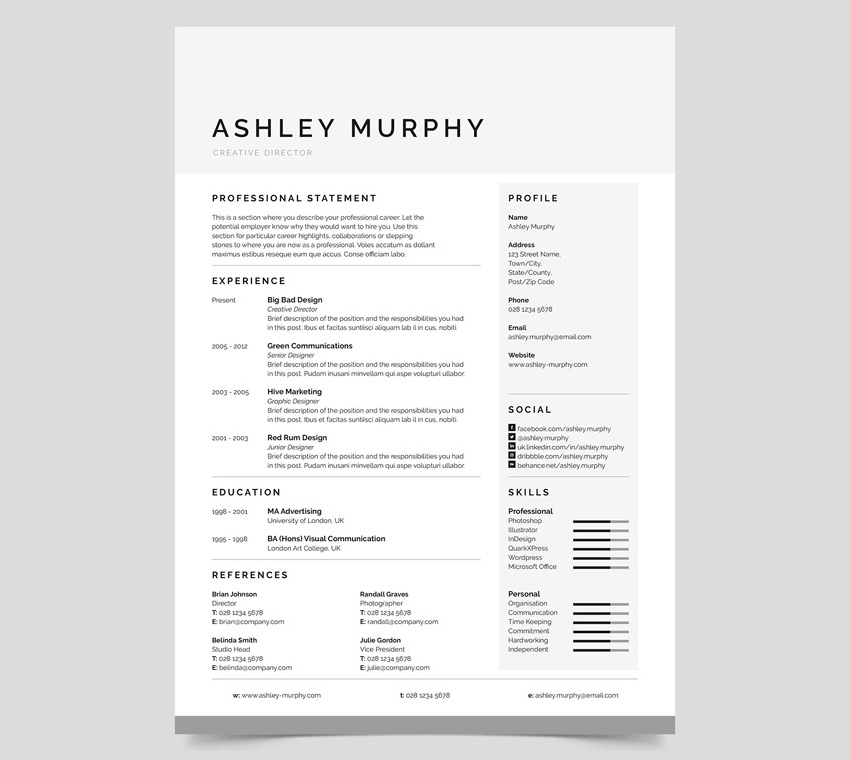
Here's an example of the popular Ashley resume template, with well structured sections and professional use of spacing: 

Popular well-space resume template ashley
Ashley - popular, well-spaced resume template. 

How to Update Your Resume With New Content

Here are 12 steps to follow to work through your resume, update it with new content, and make sure it's current and relevant to the job you're applying to.

Step 1. Emphasize Where You Want to Go

Look at the oldest job title in your work history. Is it still relevant to the job you’re applying for? If it’s not, delete it then use the extra space to add more skills and accomplishments to your remaining—and hopefully relevant—job titles.

In the same note, you should also delete skills or tasks you’re no longer interested in. For instance, I worked as a Real Estate Virtual Assistant (VA) before I switched to writing. I’m still interested in the real estate industry, but I’m not too keen on updating MLS listings and coordinating meetings for agents.

My resume’s work history still includes “Real Estate Virtual Assistant” but instead of a list of accomplishments in my former role, it only includes a brief description of my role and the kind of real estate transactions I helped with. This strategy helps me avoid questions about my VA tasks, without erasing evidence of my real estate background. And because I still get real estate writing gigs until now, I think this works.

Step 2. Include New Certifications and Training

You might get overwhelmed with all the possible ways you can improve your resume’s content. Let’s start with the easiest: training.

Did you attend training events and seminars since you last updated your resume? Did you take a course online, or attend a company-mandated refresher course? If so, add it to your resume’s education section.

It’s easy to add this information because you don’t have to come up with the information on your own. Just write the following:

  • Name of training event
  • Where it took place: company name, or location of seminar
  • Facilitator’s name: name of third-party training company, or name of employer’s in-house trainer
  • Training date: month and year

Step 3. Add Recent Recognition and Awards

Here’s another easy update: company awards and recognition. Add company issued, and even department or team-based awards. Don’t sweat the details, just list the award won, who gave it (if applicable), and when it was given.

Even small awards, like those for perfect attendance and employee of the month awards, add to your credibility.

Step 4. Update Your Tech Skills

Is “Proficient in MS Word” still in your resume? Remove it. General skills like this give the impression that you’re not up to date in the tech world, much less in your industry.

In-demand and widely applicable technical skills right now include data analysis, MS Excel, and social media. But if you’re not sure what kind of tech skills are hot in your line of work, look at the skills your peers use on LinkedIn.  

Step 5. Add New Projects

Here’s where it starts to get a little tricky, or at least a bit more time consuming.

Remember how you impressed the person who asked for your resume? What did you discuss? Think about the office projects and side gigs you talked about. That’s what made you impressive, so make sure it’s on your resume.

Other Things to Consider

  • Skills or achievements not commonly associated to your job title
  • Interesting projects and events you participated in outside of work
  • Company or local-community initiatives with massive impact

Step 6. Integrate Critical Resume Keywords

Edit your resume to add keywords in your job title, career summary, skills section, and education.

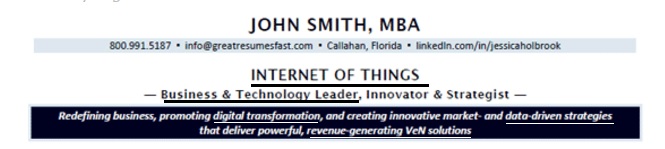
In this creative example from Jessica Holbrook Hernandez, President of Great Resumes Fast, she added keywords to the position title at the top, and the branding statement (dark blue background). Keywords added include internet of things, data-driven strategies, revenue-generating VeN solutions, and more.

Keywords added to resume example
Keywords added to title and brand statement.

Learn more about how to add keywords into your resume: 

Step 7. Rewrite Boring Work History

Rewrite and edit any part of your work history that sounds like a job description copied off a job ad. To replace your everyday tasks with accomplishments, ask yourself what that task accomplished.

For example, did the logo you create boost your employer’s image online? Was the training program you helped create used to on-board new employees? 

Step 8. Update Your Resume’s Lingo or Jargon

Your diction might make you look old, even on your resume.

Vicki Salemi, Author of Big Career in the Big City, suggests you “use the language of the employer you’re pursuing, not the one you’re already working for.”

For instance, “Personnel management” is an old school approach to what’s now referred to as “Human Resource Management.” As an industry outsider, you might not see the point or the difference between the two phrases, but an industry insider will.

Whatever job you’re in, you may be using off-base industry specific jargon too. Talk to your younger or fresh-grad co-workers to see what’s changed in your industry’s jargon.

Step 9. Remove the Objective Section

“You don’t need to tell the employer that your objective is to secure a position in their company. They know”, says Biron Clark, former Executive Recruiter and Founder of Career Sidekick.

If you haven’t already, replace your career objective with a career summary. Here’s how:

Step 10. Proofread and Spell Check

“The fastest thing you can do to improve your resume is ask another person to read it. Don't let spelling mistakes and typos let you down, especially if the company is looking for someone with an eye for detail”, suggests Sarah Dowzell COO at Natural HR.

It's important to edit and polish your resume. If you can’t find someone to read it for you, use your word processor or computer’s narrator tool. 

Then as a final test, use online tools like Grammarly and Hemingway to find spelling and grammar mistakes you might have missed. 

Step 11. Check for Inconsistent Verb Tenses

Previous jobs should have past-tense verbs, while your current job should have present tense verbs. It sounds simple, but a lot of resumes have inconsistent tenses.

Step 12. Add Power Words

Replace overused words like “responsible for” and “handle” with authoritative words. Check out the free download I wrote for this guide for a list of power words you can add to your resume:

Make Updating Your Resume a Regular Habit

If you’ve completed all the resume edit and update tips here, congratulations! Your resume is good as new. It’s time to save it with a new file name—with your name and the job title you’re aiming for.

Make it a habit to update your resume often, so you’re not caught unprepared when an amazing opportunity comes knocking at your doors. 

Editorial Note: This content was originally published in March of 2017. We're sharing it again because our editors have determined that this information is still accurate and relevant.


20+ Awesome Tips to Make Interesting Online Presentations in 2020

20+ Awesome Tips to Make Interesting Online Presentations in 2020

When making an online presentation one of the first questions you may search on is how to make an online presentation interesting? Look no further! 

Mozario Slide Presentation Online
Mozario is just one of many Envato Elements slide presentation templates that look great online.

There are many similarities between creating a presentation that you present live and giving a slide presentation online. In today's business environment, online business presentations are becoming more common.

In this article, we'll provide presentation tips on how to make an online presentation interesting for every stage of presentation development. 

The first stage is planning your online presentation. Next, we'll discuss the design of your online presentation and give tips to make sure you've got the best online presentation design. Finally, we'll explain how to deliver your online presentation in exciting ways so that you engage your audience.

Find Great Online Presentation Templates on Envato Elements

Before we get into our online presentation tips, let's talk about your presentation design. Presentation design is important because it affects how the audience perceives you.

If you're giving an online presentation or uploading a presentation for online viewing, you don't have time to design an online presentation template from scratch. Luckily, you don't have to.

The best place for presentation templates is from Envato Elements, a flat rate subscription service built with creatives and freelancers in mind. For a single monthly fee, you've got unlimited downloads to choose from spanning an incredible variety of categories. That includes graphics, stock photos, and of course—engaging online presentation templates.

Templates for slide presentations online
Choose from thousands of templates to use for your online presentation at Envato Elements.

Or, if you don't want to commit to a subscription, buy presentation templates one-at-time. Our Envato Market sites, such as GraphicRiver, let you buy and download templates for one-time-use as you need them. 

Now let's tackle our tips for online presentations.

7 Tips on Planning Your Online Presentation

When planning your online presentation, you want to give the best presentation you can. Here are some online presentation tips to get you started:

1. Prepare Your Technology

When doing an online presentation, technology is involved. Make sure all technology needed for the presentation is available, tested, and working. You'll need a good internet connection if you’re using WIFI, so make sure you've got a strong connection. 

You should also make sure that there are no other applications or windows open other than what you need for your presentation. It's helpful to have a backup computer or tablet as a backup device to present your presentation in case your primary device stops working.

2. Check the Audio

How to Make a Good Online Presentation with Microphone
Getting a higher quality microphone can improve your online presentation audio. (Image source: Envato Elements)

Make sure that your online readers can hear your presentation clearly. Also, make sure that there isn’t a lot of background noise like fans, street noise, pets, etc. You don’t want your audience to be distracted by background noise. 

If you're using a headset, make sure that it's hooked up properly and working. If you think you'll be giving a lot of online presentations, it may be worthwhile to invest in a higher quality microphone.

3. Practice Your Presentation

Practicing your online slide presentation can help you make sure that you've got the wording down, so you'll be effective in communicating your message. Even though you can edit an online presentation, you want to reduce the amount of editing needed. With practice, you can prevent a mistake from happening such as your slides not showing up clearly or in the right order. 

When practicing your presentation, check that your slides can be easily read. You don’t want your readers to have trouble understanding your slides.

4. Select Your Main Points

Select the main points for your online presentation based on how long your presentation needs to be. If your presentation is short, select only the main points that are important. If you can have a more extended presentation, then leave all your main points in.

Here's a tutorial that'll help you choose an interesting topic:

5. Use the Best Information

When researching information, use your online presentation skills to support your main topics. Make sure that the information clarifies your main point. If your supporting information doesn't really back up your main points, it makes it hard for the audience to understand. You want the information that you use to support your main points and even clarify them.

6. Know Your Audience

Audience for online presentation
Discover who the audience for your online presentation is and try to connect with them. (Image source: Envato Elements)

To make awesome presentations online, you've got to know your audience. When you're presenting, you want to connect with your audience so the audience remembers what you discussed. Researching your audience can also help you use the best visuals that'll connect with them.

Understanding who your audience is may be simple if you're giving an online presentation to a remote group of work colleagues. It can be more challenging if you're downloading the presentation for anyone to access.

7. Make an Outline

An online presentation planning tip is to make an outline before adding information to slides. Creating an outline will help you see what information you want to add to the presentation. It'll also help you know if you left any information out or need to add in more details. A detailed outline can help you plan on what information you want to put on each slide.

7 Design Tips to Create the Best Online Presentation

When creating your online presentation, you want your presentation to look professional and attention-grabbing. Here are some online presentation tips to help you create cool presentations online:

1. Have Visuals

Presentation Tips Visuals
Graphic images, like this one from Envato Elements, can make your presentation more interesting.

There are many types of visuals that you can use in your online presentation. Here are a few examples of visuals and their benefits:

  • Pictures or photos can help the audience see what you're talking about. They can create an emotional response from your audience.
  • Video engages the audience. It can give the presenter a little break from their presentation. Just like pictures, video can create an emotional response from your audience.
  • Charts and graphs are a great way to show data to your audience. They can help the audience compare data. Using charts and graphs also makes data visually pleasing.

 Having visuals in your presentation will make your presentation more attractive. When using visuals in your slide presentation online, make sure not to use too many. You want to keep the visuals on each slide to a minimum because you don’t want to overwhelm the audience.

The tutorial below will help you add maps, a type of visual, to Google Slides:

2. Have a Theme

When creating your slide presentation online, consider what you want your theme to be. There are two basic types of theme elements that you can use in your presentation. 

The first is a color theme. For this theme element, you'll want to choose colors that go well together and don't distract the audience. 

A second theme element is to use an industry or field-specific theme. For example, if you're giving a medical presentation, then use a medical-themed presentation template.

3. Minimal

Having a minimal theme with less on your slide is a popular design trend. When you're giving your presentation, you don’t want the audience to be focused on your slides. You want them to focus on the information. Too many pictures, text, and animation can distract and overwhelm your audience.

Minimal
Minima is a Google Slides presentation template with a minimal theme.

4. Consistency

When creating an online presentation, a tip is to stay consistent throughout your presentation. This means that your color scheme should be the same or similar on every slide. Your fonts should all be the same on every slide. When you aren’t consistent it makes your presentation look sloppy and unprofessional.

5. Get Rid of Bullet Points

Bullet points are boring and old fashioned. Now you can use icons to anchor your text instead of bullet points. 

Icons add a visual element to make your slide presentation online more interesting without overdoing it. When using icons instead of bullet points make sure you don’t have more than three or four, otherwise your slide can look too crowded.

6. Highlight Keywords

When making your slide presentation online, highlight keywords or words that you want the audience to remember. This will make those words stand out to the audience. Highlighting keywords is a subtle way of letting your audience know what you want them to remember.

 7. Bright Colors

Another trend is using bright colors on your slides. This is one way to create a cool presentation online without doing too much. When using bright colors be careful not to go overboard. You want the bright colors to be fun and interesting, not a distraction.

colorful business presentation template
The Penatra is a colorful business presentation template.

7 Tips on the Delivery of Your Online Presentation

When you deliver your presentation, you need to have an interesting and engaging presentation so that the audience will remember it. Here are some tips on how to create an interesting and engaging online presentation:

1. Use Humor

No matter how good your online presentation skills are your audience’s attention will drop off at some point. That's why adding a joke into your presentation can wake your audience up and gain their attention again. 

When using humor make sure that you know your audience. You want your audience to laugh and loosen up, not get offended or angry. It's also best to keep your joke or humor relevant to the main topic of your online presentation.

2. Have a Contest

Having a contest where you give out a prize at the end is a good way to get the audience to remember your online presentation. For example, you could have your audience answer questions, and whoever answers the most questions right at the end wins. This will bring out your audience’s competitiveness and possibly get them taking notes.

3. Poll the Audience

Polling the audience is a good way to get audience feedback. Poll them electronically using a website or app. When you poll the audience, you'll know if your audience is understanding the topic in your online presentation. Polling your audience is a fun way to interact with them and keep them interested.

4. Start With a Question

Starting your online business presentation with a question can get the audience curious about your topic. Be sure to answer the question throughout your presentation. 

Asking the audience a question not only engages them but gets the audience to think about the topic. When choosing a question, you'll have to know your audience. Knowing your audience enables you to choose a question that's exciting and intriguing for them.

5. Have a Live Q & A

Part of how to make an excellent online presentation is engaging your audience. Having a question and answer session for an online slideshow is the easiest way to do that because it's more like a natural conversation. 

Have the audience ask questions that they want to know more about. A question and answer section also can give you more time to convince any of your audience who wasn't previously convinced.

6. Use Pop Culture

Presentation Tips Pop Culture
Pop culture references to popular musicians or televisions shows can help your audience relate. (Image source: Envato Elements)

Sometimes it's hard to relate to your audience when doing an online presentation. One way you can relate to your audience is by making a pop culture reference or using a meme in your presentation. This can help you connect with your audience and help them understand more of what you're talking about. Using a meme can even lighten the mood.

7. Use Social Media

If you're giving your online presentation to a broad audience, use social media to get questions from your audience or feedback. Create a unique hashtag that you tell your audience to use and pick out comments or questions from users who have used that hashtag.

5 Best Interesting Presentation Templates From Envato Elements

Using premium templates saves more time than making a presentation from scratch. Every premium template from Envato Elements can be easily customized to suit your needs. Here are some of the best online presentation templates from Envato Elements:

1. Sunshine PowerPoint Template

Sunshine PowerPoint Template

Sunshine PowerPoint Template has a unique theme that can be used for any purpose. This template comes with three color schemes. Easily add an image to your slide by dragging and dropping a picture of your choice into the image place holder.

2. Zorro - Google Slides Template

Zorro Google Slides Template

Zorro Google Slides Template comes with over 150 slides that you can add information to. This multipurpose template has an impressive design that isn't distracting. This template comes with illustrations, infographics, and picture placeholders.

3. Modern Keynote Template

Modern Keynote Template

This Keynote template uses a color gradient to make an exciting template design. If you don’t like the colors, there are five premade color schemes that you can choose from. With over 150 slides, you've plenty of slides to use in your presentation.

4. Diving PowerPoint Template

Diving PowerPoint Template

Diving PowerPoint Template is a water-themed presentation template. This template is excellent for business purposes. It comes with infographics, illustrations, and picture placeholders. This template also comes with over 150 slides that you can put your information on.

5. Mozario PowerPoint Template

Mazario PowerPoint Tmeplate

Mozario PowerPoint Template has appealing infographics and illustrations. This template comes with five color schemes that you can choose from to customize the presentation. Easily add an image of your choice to the slide by dragging and dropping the image into an image placeholder.

More Premium Templates for Your Online Presentation

If you didn’t see a template that you liked above, there are plenty more premium templates on Envato Elements. Here are some articles that feature Premium Templates:

Start Your Online Presentation Today With a Premium Template!

Creating an online presentation is easy now that you've read some tips to help you get started. With the presentation tips in this article, you can create an exciting and engaging online presentation.

Using a premium template will save you time and help you get started on your presentation. Envato Elements and GraphicRiver have big collections of online presentation templates that you can choose from. So, download a template and get started today!